%in% and %notin% operators in R
Page content
- Introduction
%in%to check the value in a vector%in%to check the value in a Data Frames%in%and%notin%to filter (subset) Data Frames based on multiple values (with dplyr)%in%and%notin%to remove columns from Data Frames%in%to select columns from Data Frames%in%to compare two Data Frames- Comparison of
%in%and == operators - Create
%notin%operator (opposite to%in%)
Introduction
%in%is a built-in infix operator, which is similar to value matching functionmatch.%in%is an infix version ofmatch.%in%returns logical vector (TRUE or FALSE but never NA) if there is a match or not for its left operand. Output logical vector has the same length as left operand.- If there are two vector
xandythen the syntax of%in%:x %in% y %in%works only with vectors%notin%is not a built-in operator and can be created by negating the%in%operator (see below)- Help syntax for
%in%operator:?"%in%"
Here are examples of how to use %in% to manipulate vectors and Data Frames in R,
%in% to check the value in a vector
%in% helpful to check any value in a vector and returns TRUE or FALSE
x <- c(1,5,10,20,20,24,45)

# check any number in x vector
20 %in% x
[1] TRUE

# check vector in vector
#
y <- c(5,45)
y %in% x
[1] TRUE TRUE

# check sequence of numbers in other sequence (find any overlapping numbers)
1:5 %in% 4:7
[1] FALSE FALSE FALSE  TRUE  TRUE

# find common numbers (intersection)
x[x %in% y]  # similar to intersect(x,y)
[1]  5 45

# check characters presents in other sequence of characters (find any overlapping characters)
LETTERS[1:5] %in% LETTERS[4:7]
[1] FALSE FALSE FALSE  TRUE  TRUE
Run the code in colab
If you have big vector (say vector with 1000 values), you can use any, all, or which functions with %in% operator
x <- 1:1000
y <- 900:2000

# check if there is any common values between a and b vectors
any(x %in% y)
[1] TRUE

# check if there are all values common between a and b vectors
all(x %in% y)
[1] FALSE

# get indexes of common values
a <- 1:10
b <- 6:200

which(a %in% b)
[1]  6  7  8  9 10
Run the code in colab
%in% to check the value in a Data Frames
Create a Data Frame
df <- data.frame(col1 = c("A", "B", "C"),
  col2 = c(1, 2, 3),
  col3 = c(0.1, 0.2, 0.3))
# output
  col1 col2 col3
1    A    1  0.1
2    B    2  0.2
3    C    3  0.3
Check if any value present in Data Frame columns
'B' %in% df$col1
[1] TRUE

# to check if any col1 value is B
df$col1  %in% 'B'
[1] FALSE  TRUE FALSE
Run the code in colab
Check vector in a Data Frame and update Data Frame values,
# check vector values in a Data Frame
lapply(df, `%in%`, c(1, 4, 0.1))
# output
$col1
[1] FALSE FALSE FALSE

$col2
[1]  TRUE FALSE FALSE

$col3
[1]  TRUE FALSE FALSE

# find and replace with 0
df[sapply(df, `%in%`, c(1, 4, 0.1))] <- 0
df
# output
  col1 col2 col3
1    A    0  0.0
2    B    2  0.2
3    C    3  0.3
Run the code in colab
%in% and %notin% to filter (subset) Data Frames based on multiple values (with dplyr)
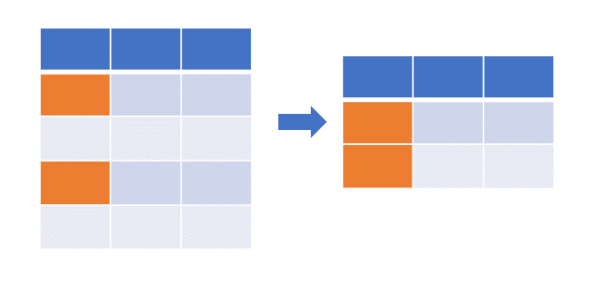
Filter (subset) Data Frame where multiple values match to col1,
library(dplyr)
df  %>% filter(col1 %in% c('A', 'B'))  # same as df[df$col1 %in% c('A', 'B'),]
# output
  col1 col2 col3
1    A    1  0.1
2    B    2  0.2
Filter (subset) Data Frame where multiple values does not match to col1 using %notin%,
#  You need to first create %notin% operator (see below at the end of this article)
library(dplyr)
df  %>% filter(col1 %notin% 'C')
# output
  col1 col2 col3
1    A    1  0.1
2    B    2  0.2
%in% and %notin% to remove column from Data Frames
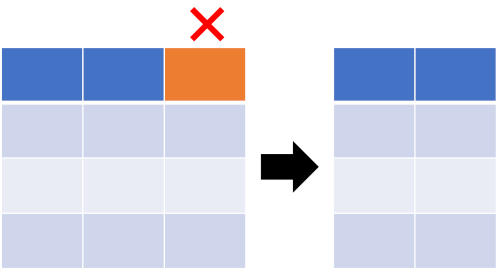
%in% and %notin% can be used to remove single or multiple columns from Data Frames
# remove col2
df[ , !(names(df) %in% "col2")]
# output
  col1 col3
1    A  0.1
2    B  0.2
3    C  0.3

#  %notin% operator to remove columns.
#  You need to first create %notin% operator (see below at the end of this article)
df[ , (names(df) %notin% "col2")]
# output
  col1 col3
1    A  0.1
2    B  0.2
3    C  0.3

# to remove multiple column use column names vector such as c("col2", "col3")
%in% to select columns from Data Frames
%in% can be used to select single or multiple columns from Data Frames
# select single column
df[ ,(names(df) %in% "col3"), drop=FALSE]
# output
  col3
1  0.1
2  0.2
3  0.3

# select multiple columns
df[ ,(names(df) %in% c("col1", "col2"))]
# output
  col1 col2
1    A    1
2    B    2
3    C    3
%in% to compare two Data Frames
%in% can be used to compare two Data Frames and subset Data Frames based on the column value match.
This is more similar like left join query i.e. select all records from one Data Frame where column values match to
another Data Frame
Create another Data Frame,
df2 <- data.frame(col1 = c("A", "B", "D", "E"),
  col4 = c(100, 200, 300, 400),
  col5 = c("a", "b", "c", "d"))

df2
# output
  col1 col4 col5
1    A  100    a
2    B  200    b
3    D  300    c
4    E  400    d
Now compare df and df2 to get all records from df2 where col1 values match to col1 values in df (similar to
left join of tables),
subset(df2, df2$col1 %in% df$col1)
# output
  col1 col4 col5
1    A  100    a
2    B  200    b
Comparison of %in% and == operators
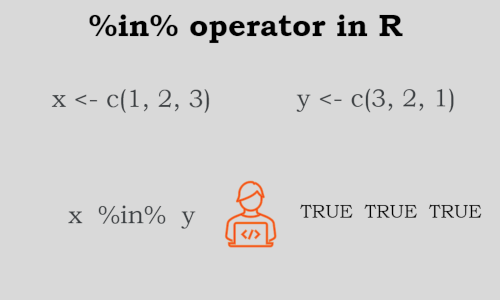
==operator compares the value between two vectors element-wise (the first value of one vector compared with the first value of another vector), whereas%in%compares the value between two vectors one by all (the first value of the first vector compared with all values of the second vector)- With
==operator, the length of the left and right operands must be the same. It is not necessary to have the same length for left and right operands for%in%operator.
x <- c(1, 2, 3)
y <- c(3, 2, 1)

x %in% y
[1] TRUE TRUE TRUE

x == y
[1] FALSE  TRUE FALSE

# compare and get indexes of two vectors
a <- c(1, 2, 9, 2)
b <- c(1, 2, 3, 4, 5)

# == operator only found first two indexes
which(a == b)
[1] 1 2
Warning message:
In a == b : longer object length is not a multiple of shorter object length

# %in% operator found all matched value indexes
which(a %in% b)
[1] 1 2 4
Run the code in colab
Create %notin% operator (opposite to %in%)
%notin% operator is not built-in and can be created by applying Negate function to %in%.
%notin% is opposite to %in% operator
You can also use %notin% as by putting ! in front of the %in% expression (!%in%)
`%notin%` <- Negate(`%in%`)
Check the value in a vector using %notin%
x <- c(1,5,10,20,20,24,45)

# check any number in x vector
50 %notin%  x # same as !(50 %in%  x)
[1] TRUE
Update values of Data Frame to NA where values does not match,
# create data frame
df <- data.frame(col1 = c("A", "B", "C"),
  col2 = c(1, 2, 3),
  col3 = c(0.1, 0.2, 0.3))

# update values of Data Frame to NA where values does not match to c(2, 3)
df[sapply(df, `%notin%`, c(2, 3))] <- NA  # df[sapply(!(df, `%in%`, c(2, 3)))] <- NA
df
# output
  col1 col2 col3
1 <NA>   NA   NA
2 <NA>    2   NA
3 <NA>    3   NA
Run the code in colab
References
- Value Matching
- The %notin% operator
- https://stackoverflow.com/questions/42637099/difference-between-the-and-in-operators-in-r/42637186
- R Infix Operator
This work is licensed under a Creative Commons Attribution 4.0 International License